Storing and processing
Hyperwallet does not guarantee that notifications are delivered in the same order as the events that generated them. Out-of-order delivery could cause issues such as reverting a KYC status that was already verified.
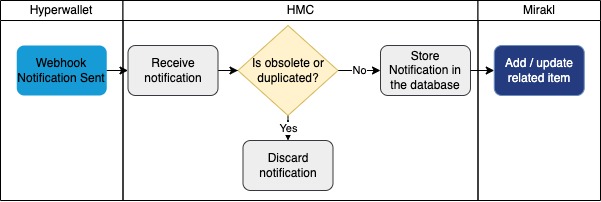
To avoid such issues, and following Hyperwallet recommendations, the connector stores every incoming notification in a processing queue and filters out duplicates, obsolete entries, and superseded ones before processing them.
Processing pipeline
When the connector receives a notification it immediately enqueues it in the NotificationEntity table with a PENDING status, unless it falls into one of the discard cases below. A periodic Quartz job (Notification Processing Job) then picks up PENDING and eligible RETRYING entries in batches and processes them asynchronously.
This design decouples webhook reception latency from downstream Mirakl and Hyperwallet call latency: the HTTP response to Hyperwallet is always fast, and any slow or failing downstream call is handled transparently by the retry mechanism.
Discard rules on enqueue
The connector discards an incoming notification at enqueue time in three cases:
-
Duplicate: a notification with the same webhook token is already stored in the database.
-
Obsolete: a notification for the same object (same
objectTokenandnotificationType) already exists in the database with a later creation date — the incoming notification is older and therefore irrelevant. -
Superseded queue entry: when a newer notification arrives for the same object, any existing
PENDINGorRETRYINGentry for that object is markedOUTDATEDbefore the new notification is saved. Entries in terminal states (SUCCESS,FAILED,OUTDATED) are never modified.
Notification lifecycle — status values
Every NotificationEntity row carries a status field that reflects the current stage of processing:
| Status | Meaning |
|---|---|
|
Received and enqueued; waiting to be picked up by the processing job. |
|
A processing attempt failed. The connector has computed a |
|
Processed successfully; no further action needed. |
|
All retry attempts have been exhausted. An email alert is sent to the operator. The entry is never retried again. |
|
Superseded by a newer notification for the same object while still |
NotificationEntity table
The connector stores the following information in the NotificationEntity table:
| Database field | Data type | Notes |
|---|---|---|
|
Long |
Autogenerated ID. |
|
String |
Token of the notification. |
|
String |
Token of the related item (seller, payment, etc.). |
|
Date |
Creation date of the notification as reported by Hyperwallet. |
|
Date |
Date on which the connector received the notification. |
|
String |
Type derived from the prefix of |
|
String |
Current lifecycle status (see table above). Defaults to |
|
Integer |
Number of processing attempts made so far. Defaults to |
|
Date |
Timestamp of the most recent failed attempt. |
|
Date |
Earliest timestamp at which the connector will attempt reprocessing. |
Notification types
The connector derives the notification type from the prefix of the object token — the segment before the first - character (e.g. usr in usr-abc123):
-
USR— Sellers -
STK— Stakeholders -
PMT— Payments (invoices) -
TRM— Bank accounts -
UNK— Unknown (object token prefix could not be parsed; stored to avoid processing failure)
Querying and housekeeping
Two endpoints are available to query or remove notifications stored in the database.
| Endpoint | Method | Description |
|---|---|---|
|
|
Query notifications stored in the database within the specified date range. |
|
|
Remove notifications stored in the database within the specified date range. |
Both endpoints accept from and to query parameters (ISO-8601 date-time format).
Example requests:
curl --location --request GET \
  'http://localhost:8080/webhooks/notifications?from=2021-04-27T10:30:00.000-00:00&to=2023-04-27T10:30:00.000-00:00'

curl --location --request DELETE \
  'http://localhost:8080/webhooks/notifications?from=2021-04-27T10:30:00.000-00:00&to=2023-04-27T10:30:00.000-00:00'
Notification Cleanup Job
The connector includes a dedicated Quartz job (NotificationCleanupJob) that automatically deletes terminal-state notifications older than the configured retention period. The job:
-
Runs on the schedule defined by
PAYPAL_HYPERWALLET_NOTIFICATIONS_CLEANUP_CRON_EXPRESSION(default:0 0 1 * * ?— daily at 01:00 UTC). -
Deletes all
NotificationEntityrows whosereceptionDateis older thanPAYPAL_HYPERWALLET_NOTIFICATIONS_CLEANUP_RETENTION_DAYS(default:90days) and whosestatusisFAILED,SUCCESS, orOUTDATED. -
Never touches rows in
PENDINGorRETRYINGstate — only rows that can no longer transition are eligible for deletion. -
Uses
@DisallowConcurrentExecution— only one instance of the job runs at a time.
The job can also be triggered on demand via the REST API (see REST API).
Notification Processing Job
The connector includes a dedicated Quartz job (NotificationProcessJob) that processes enqueued notifications in batches. The job:
-
Runs on the schedule defined by
PAYPAL_HYPERWALLET_NOTIFICATIONS_PROCESSING_CRON_EXPRESSION(default: every 30 seconds). -
Fetches up to
PAYPAL_HYPERWALLET_NOTIFICATIONS_BATCH_SIZE(default:100) entries whose status isPENDINGorRETRYINGand whosenextRetryDateis in the past (ornull). -
Processes entries in ascending
creationDateorder to preserve relative ordering. -
Uses
@DisallowConcurrentExecution— only one instance of the job runs at a time.
The job can also be triggered on demand via the REST API (see REST API).